
How It Works
User Integration API Documentation
1. Introduction
The User Integration API allows eCommerce vendors to seamlessly create accounts for users already registered on our platform. When users wish to sign up on a partner's eCommerce site, they can do so effortlessly through our API, which fetches their stored information directly from our database. This ensures a smooth registration process without the need for additional form filling.
2. Authentication
The User Integration API uses API keys for authentication. Vendors must include their API key in the request headers to access user information.
Obtaining Your API Key
Register for an account on our platform.
Navigate to the API section in your account settings.
Generate a new API key.
3. Example of Authentication javascript PHP
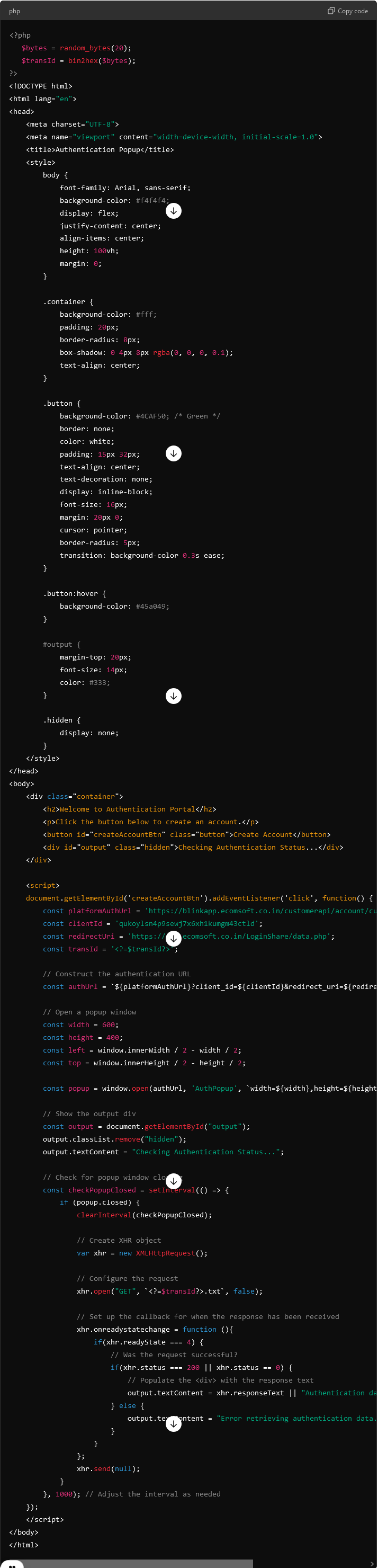
- Explanation of Changes:
1. HTML Structure: - Added a <div> with a container class to hold the content centrally.
Styled the button and the output section for better presentation.
2. CSS Styling: - Styled the body and container for a clean and centered layout.
Customized the button and output text for better user interaction and readability.
Added transitions and hover effects for the button to enhance the user experience.
Added a .hidden class to manage the visibility of the output text.
3. JavaScript Logic: - Display a message when the popup is opened and check for its closure.
Handle the popup closure to fetch and display the authentication data.
Error Handling
- Common Error Codes
- 400 Bad Request: The request was invalid
401 Unauthorized: Invalid API key. Verify your authentication credentials.
404 Not Found: The requested user was not found in our database.
Troubleshooting Errors - Check the status code and message for details. Ensure your request parameters meet API requirements.
8. Use Cases
Seamless User Registration: Users can quickly create accounts on vendor sites without re-entering information.
Improved User Experience: By automating the sign-up process, users can access services faster.
9. FAQs
Q: How do I reset my API key?
A: Visit your account settings and generate a new API key.
Q: Is there a sandbox environment available for testing?
A: Yes, we offer a sandbox environment for developers to test their integrations.
10. Contact Information
For support, please reach out to us at:
Email: support@yourplatform.com
Community Forum: User Integration Community